From Receipt Photo to State-Ready Reimbursement
Florida homeschool parents drop in a receipt and get back a reimbursement-ready PDF with the details filled in.
The Problem
Florida's PEP program reimburses homeschool families for educational purchases, but every claim goes through the state's portal one field at a time. You pull up the receipt, hunt for the date, the order number, the amount, and the category in different places, then type each one into the form. Often you also have to submit two documents: the receipt and the bank record showing the money leaving your account. It is slow, and it repeats for every purchase.
What It Does
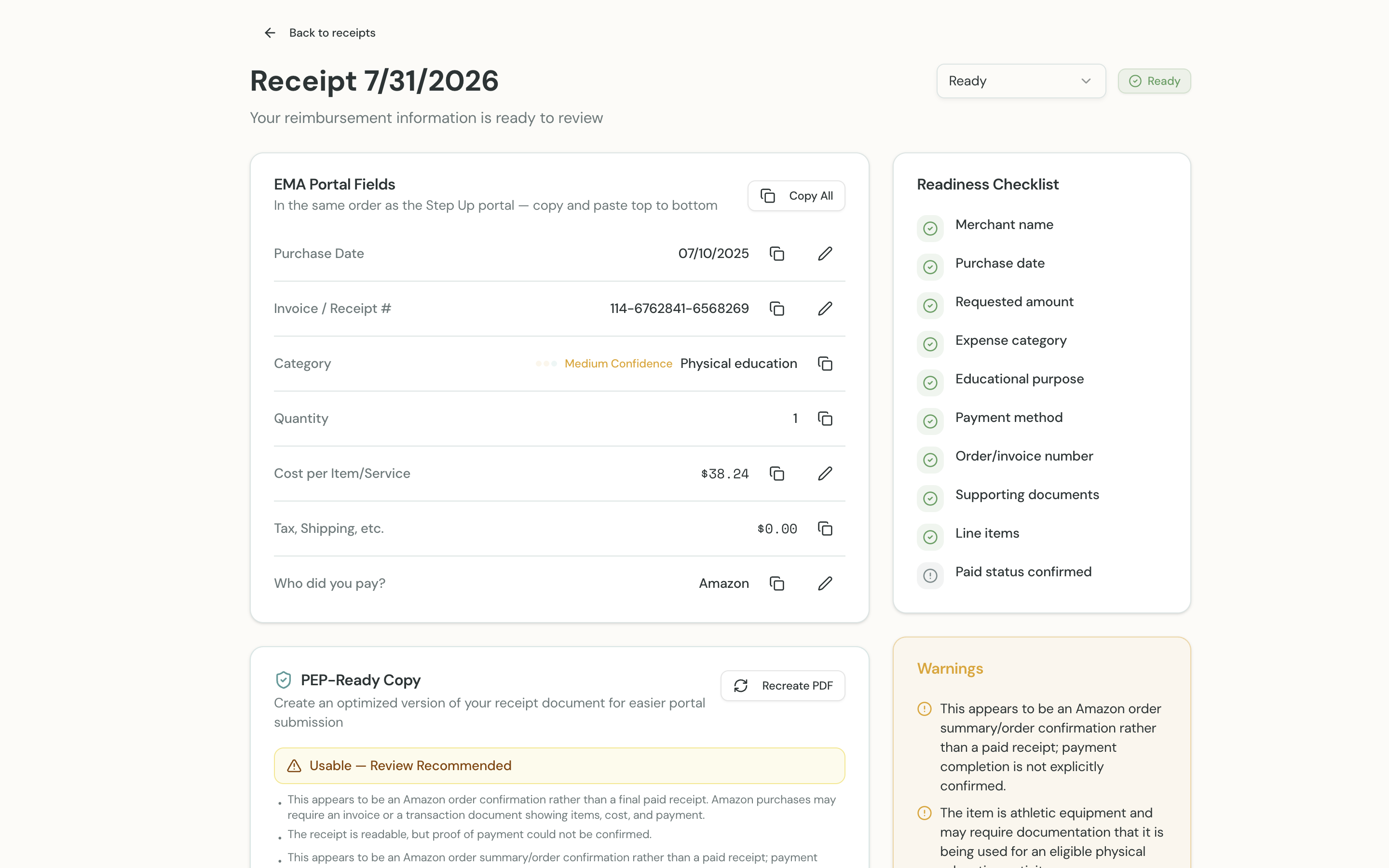
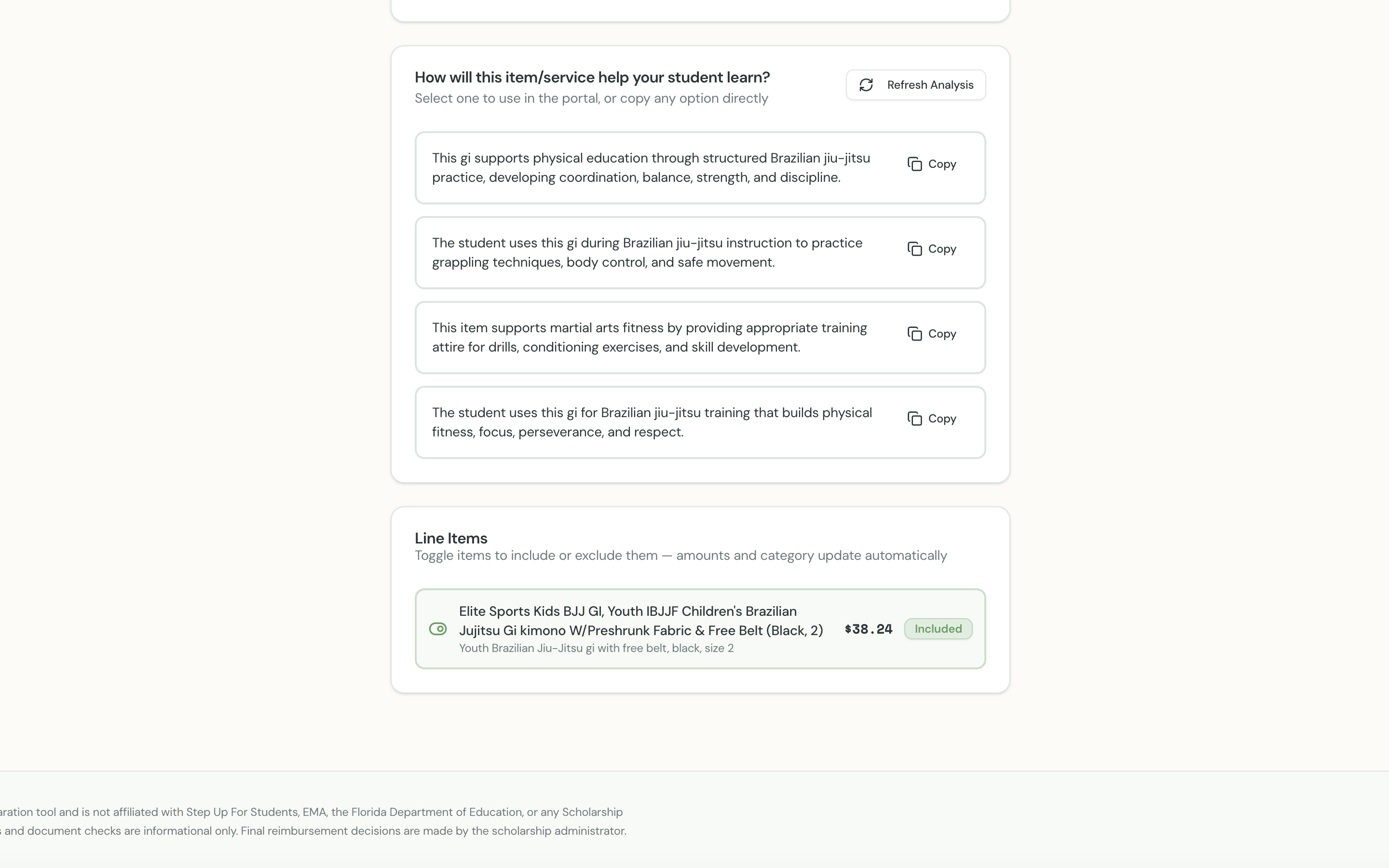
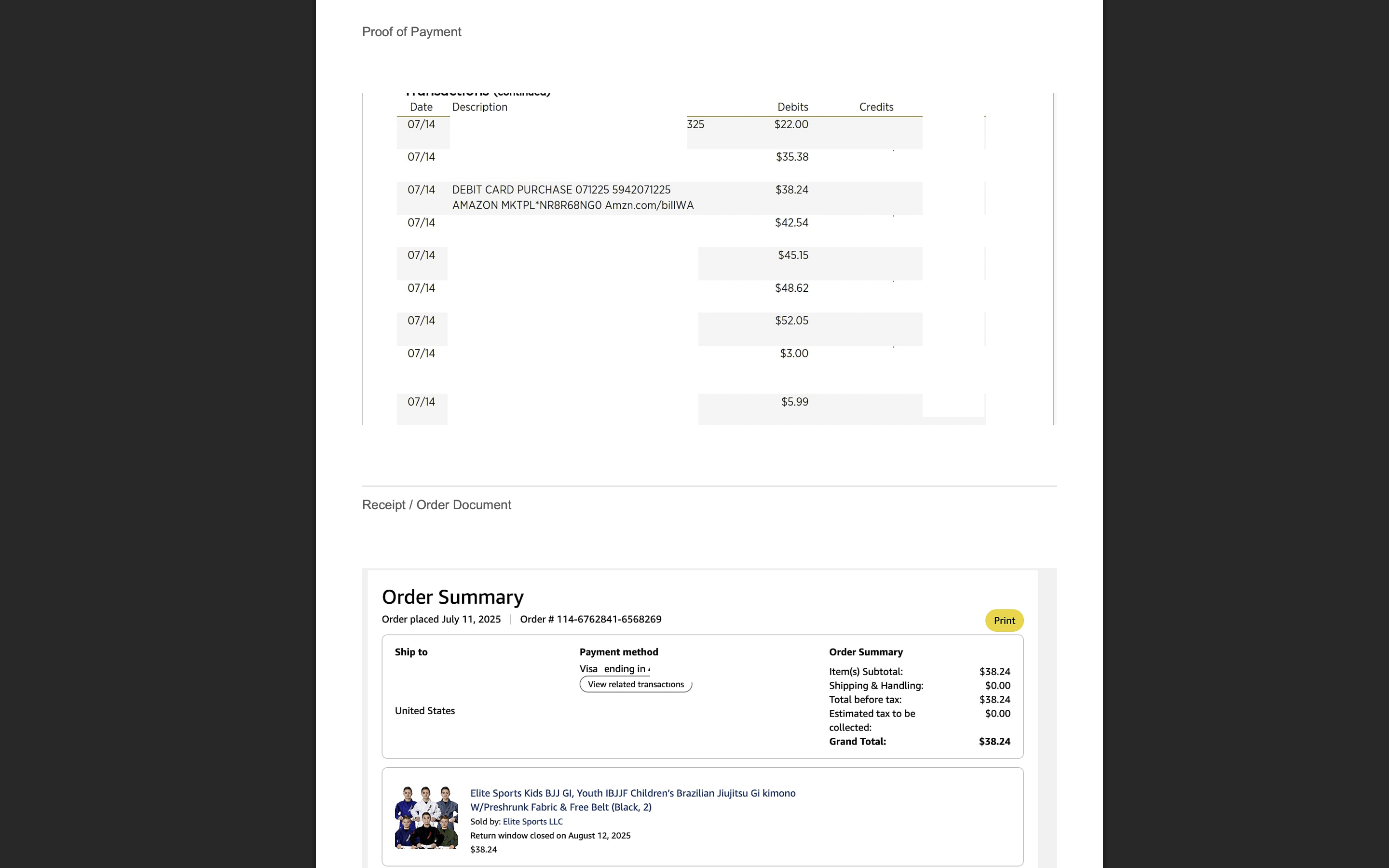
A parent signs in, picks which child the purchase was for, and drops in a photo or PDF of the receipt. The app reads the receipt with a vision model and pulls out the merchant, date, order number, each line item, the totals, and how it was paid. It matches the purchase to one of the 24 PEP spending categories and drafts three or four educational-purpose statements written around the child's age, grade, and interests. The fields come back in the exact order the state portal asks for them, with a copy button on each one. The parent unchecks any items that should not be claimed, picks a purpose statement, and can attach the bank statement as proof of payment. The app flags anything the state is likely to bounce, cleans up the image, and produces one PDF with the proof and the receipt on a single page under a standardized filename.
Built for Ryan's own household, for the parent who does the reimbursement paperwork.
Screenshots
How It's Built
A React front end talks to an Express API over a contract generated from an OpenAPI spec, so the client, the server validators, and the types all come from one file. Uploads go straight from the browser to private object storage using a presigned URL; the server only handles metadata, then downloads the file itself when it needs it. The analyze step sends the receipt image to a vision model with a strict JSON schema, gets back structured fields, line items, warnings, and a confidence score, and matches the model's category guess against the category table by exact and substring comparison. A second model call drafts educational-purpose statements from the first extracted item and the child's profile. Re-analysis replaces earlier machine-generated items but keeps any row the parent edited. A deterministic preflight pass reuses the extraction data to grade the packet ready, review, or retake, with retake reserved for image-quality problems and low confidence. The optimize step runs the image through Sharp (auto-orient, normalize, sharpen, JPEG), lays it on a US Letter page with pdf-lib, and when a proof of payment is attached, stacks proof above receipt on one page or splits to two pages if either would render too small to read. The original receipt is never overwritten; the optimized PDF is a separate object.
By the numbers
- first commit to public deployment
- 4 days (2026-07-28 to 2026-07-31)
- PEP spending categories the classifier chooses from
- 24
- educational-purpose statements drafted per receipt
- 3 to 4
- documents combined into one submission PDF
- 2 (receipt plus proof of payment)
- API routes
- 45
- database tables
- 9
- households using it
- 1
Key Decisions
Extracted fields are shown in the same order as the state portal's form, each with its own copy button
The whole point was to stop hunting through a receipt for each field; the parent copies top to bottom and pastes into the form in the same order
Receipt and bank statement are combined onto one page of one PDF
The state often wants both documents, and it prefers everything on one page
Preflight readiness is a deterministic scorer over fields the extraction already produced, not another model call
The scorer reuses what was already extracted, so grading a packet costs nothing and gives the same answer every time
Confidence below 0.5 means retake the photo, 0.5 to 0.7 means review it
Starting points chosen to begin with, not tuned against real receipts yet
Re-derive category and purpose statements from the included line items without re-uploading the image
When a parent unchecks items the claim changes, and the text-only refresh avoids a second vision call on the same receipt
Every extracted line item is included by default and the parent excludes
Deciding what counts as reimbursable is left to the parent; the model suggests, it does not silently drop lines
Attaching or replacing a proof of payment resets an already-optimized packet to needs_recreate
The generated PDF would no longer match what is attached, so the parent is forced to regenerate it
Combined PDF uses contain scaling and falls back to two pages when either image would render under 120 points tall
Never stretch or crop a receipt, and never ship a page where the proof or the receipt is too small to read
Built for one household, not as a product
It was made for Ryan's wife to use at home; there was never a plan to sell it
Where else this applies
Any process where a person has to move facts from a scanned document into a form with strict rules: expense reports, insurance claims, grant reimbursements, HSA and FSA substantiation, warranty claims. The shape is the same every time: extract with a schema, let a human correct and exclude, grade readiness against the rules before submission, and hand back a clean document with a filename the receiving system expects.